The Model S Plaid runs the same Boombox feature as the rest of the Tesla lineup, but the audio chain behind it is in a different league: a 22-speaker, 960-watt system with dedicated subs and tweeters, MCU3 (AMD Ryzen) handling playback, and the same external pedestrian speaker that fires the lock chime. Owners searching specifically for "Plaid lock sound" usually want two things: confirmation that the trim isn't gimped versus a base Model S, and tips for not wasting the audio system on a thin meme clip.
This guide covers both: full Plaid compatibility, the exact USB layout, and which sounds actually showcase the 22-speaker setup once you're inside cabin and the door is closed.
Plaid Audio Hardware: What Actually Matters for Lock Sounds
The Plaid's audio system has 22 speakers, 960W amplification, and active noise cancellation. Three things matter for lock sound playback:
- External pedestrian warning speaker. This is the single driver that plays the lock chime when you walk away from a parked car. It's identical to the one on the base Model S; Plaid doesn't add an exterior tweeter. So sound character outside the car is the same as a non-Plaid refresh.
- Cabin playback (testing). When you preview a Boombox sound from inside the car, MCU3 routes it through the full 22-speaker system. Bass response, stereo image, and detail come through far better than any test on a Model 3 or Model Y.
- MCU3 + 2022.4.x firmware. The Plaid shipped with MCU3 from day one and got Boombox at launch. There's no firmware upgrade path needed for any 2021+ Plaid build.
The yoke vs. round wheel debate doesn't affect lock sounds; it's a steering decision, not an audio one.
Find sounds for your Tesla
Every sound works with Model 3, Y, S, X, and Cybertruck.
Confirm Boombox Support on Your Plaid
Every Tesla Model S Plaid (2021+) supports custom lock sounds via Boombox out of the box. To verify on your specific car:
- Open the touchscreen → Toybox → Boombox
- You should see "External Speaker" toggle and "Lock Sound" selector
- If you see a "Custom Sound Not Available" message, check Controls → Software for firmware version 2022.4 or later (every Plaid is well past this)
If Boombox is missing entirely, your car's external pedestrian speaker is faulted; that's a service appointment, not a software issue.
USB Format + File Layout
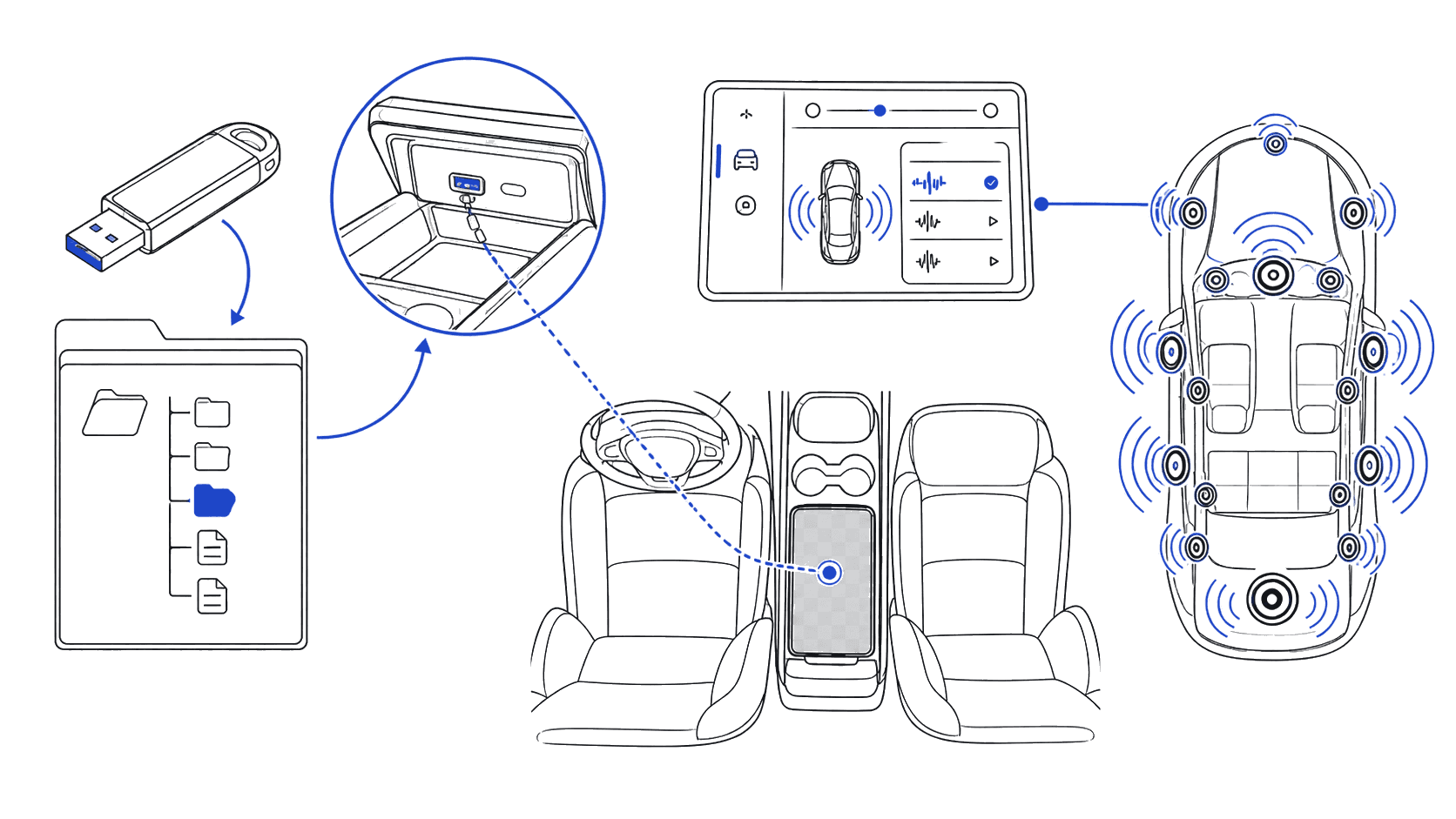
The Plaid is identical to the rest of the lineup on this. One USB drive, one folder, one file:
USB Drive (FAT32 or exFAT)
└── Boombox/
    └── LockChime.wav
File requirements:
- Format: WAV, uncompressed
- Sample rate: 44.1kHz
- Bit depth: 16-bit
- Length: under 2 seconds (Tesla truncates longer clips)
- Filename: exactly
LockChime.wav(case matters)
A guide on USB format choices covers FAT32 vs. exFAT trade-offs if you're starting fresh. For most Plaid owners, FAT32 on a 32GB or smaller drive is the most reliable path: it removes any edge case where MCU3 doesn't recognize the partition.
All free Tesla lock sounds on this site are already exported to spec and named LockChime.wav, ready to drop straight onto a fresh-formatted drive.
Step-by-Step: Installation on the Plaid Interior
The Plaid's port layout is the same as the 2021+ refresh:
- Glovebox USB-C (preferred): open the glovebox, the USB-C port on the right side handles Boombox. Some early-build Plaids have only a single port here; later builds have two.
- Center console wireless pad area: there are USB-C ports inside the console for charging, but only the glovebox port reads Boombox files on most Plaids. Test glovebox first.
- With the car in Park, insert the formatted USB drive into the glovebox USB-C port.
- Touchscreen → Toybox → Boombox → tap the Lock Sound selector.
- Choose your custom
LockChime.wavfrom the list. - Walk out, close the door, and lock with the keycard or app. The new sound fires from the external speaker.
If the file doesn't appear: eject the drive, verify FAT32 formatting, confirm the file is at /Boombox/LockChime.wav (not nested deeper), and re-insert. The full Tesla lock sound installation guide covers the same flow with screenshots.
Best Lock Sounds for the Plaid Audio System
The pedestrian speaker that actually plays the lock chime is mono and limited to roughly 200Hz–8kHz, so don't pick a sound expecting the full 22-speaker experience outside the car. But because Plaid owners often preview sounds from the cabin first, it's still worth picking clips that don't sound thin in the bigger system.
Five sounds that hold up on the 22-speaker system:
- Synth Wave Pulse: full-range with a defined bass note; reads as confident on both the external speaker and the cabin system.
- Cinematic Riser (Sci-Fi category): short orchestral hit with a mid-range punch; cuts through wind and street noise outside the car. See the /sounds/model/model-s curated picks.
- Bass Drop Confirmation: tight low-mid impact, doesn't muddy the external speaker.
- Layered Notification Chime: clean tonal bell with reverb tail; the Plaid cabin shows off the tail length.
- Starship Door: classic sci-fi whoosh with low-frequency body.
Curated full list at /sounds/model/model-s: every sound there is sized for the dual-speaker (and by extension Plaid) audio path.
Avoid: heavily compressed meme clips, anything mastered for phone speakers, sounds with sub-bass below 100Hz (the external speaker can't reproduce it cleanly and it'll just sound flubby).
Volume Calibration for the 22-Speaker System
The most common mistake on Plaid: assuming "more speakers = louder is fine." The external pedestrian speaker is the bottleneck for the lock sound, and pushing it too hot causes audible clipping that the 22-speaker cabin system would never produce. Calibration approach:
- Normalize the source file to -6dB peak, not -3dB. Plaid owners report cleaner results at -6dB on the external speaker; the headroom prevents clipping when ambient temperature changes amplifier behavior.
- High-pass at 100Hz. Anything below adds no audible bass through the pedestrian speaker and just eats headroom.
- Low-pass at 8kHz. Frequencies above this are filtered by the speaker anyway; leaving them in just makes the sound feel sibilant during preview.
- Test outside the car at 10ft, 20ft, and 30ft. The cabin system is misleading: it'll sound great in there even if the external speaker is clipping. Walk-test is the only reliable check.
- If clipping is audible, drop another 3dB. Distortion on the lock chime is the single biggest reason Plaid owners say their custom sound "sounds cheap."
A general troubleshooting guide covers other Boombox playback issues that aren't Plaid-specific.
FAQ
Does the Tesla Model S Plaid support custom lock sounds?
Yes, every 2021+ Model S Plaid supports custom lock sounds via Boombox out of the box. The hardware (external pedestrian speaker + MCU3) and the firmware (2022.4+) are both present from launch. There's no Plaid-specific gatekeeping.
Is the Plaid lock sound louder than a base Model S?
No. The lock sound plays through the same single external pedestrian warning speaker on every refresh Model S, Plaid or not. The 22-speaker system is for cabin audio only. Where Plaid owners notice a difference is when previewing sounds from inside the car: the cabin system reveals detail that gets lost on a Model 3 preview.
Where's the USB port for Boombox on a Plaid?
Use the USB-C port inside the glovebox. The center console USB-C ports charge devices but don't always read Boombox files. Glovebox is the consistent path on every Plaid build.
Why does my Plaid lock sound clip even though the cabin audio is clean?
The external pedestrian speaker has far less headroom than the 22-speaker cabin system. Files normalized for the cabin (-3dB peak) routinely clip on the external speaker. Drop to -6dB peak and high-pass at 100Hz; that solves about 90% of "Plaid lock sound sounds bad" complaints.
Can I use the same sound on a Plaid that I use on my Model 3?
Yes, there's no Plaid-specific format or restriction. The same LockChime.wav works across every Boombox-equipped Tesla. The only reason to re-export is if you want to push the file slightly hotter (Model 3) or pull it back for cleaner Plaid playback (-6dB).
See Also
- Tesla Model S Custom Lock Sound Guide: how to change the lock sound on any 2021-refresh-or-later Model S
- Best Tesla Model S Lock Sounds: curated picks for the dual-speaker audio path
- Tesla Lock Sound Installation Guide: step-by-step with screenshots
- Best Tesla Lock Sounds 2026: top picks across all trims
- USB format: FAT32 vs exFAT: pick the right format
- Troubleshooting custom sounds: fix common Boombox issues